AI MP3 Player1.11
Publisher Description
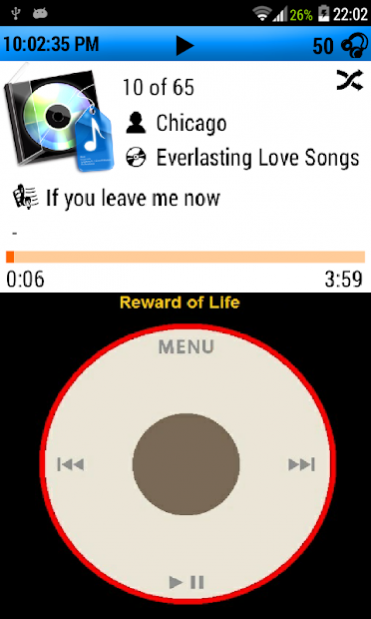
A simple mp3 player with ease to use scroll wheel user interface.
* The App was built with App Inventor and intent for education.*
Very Important!!! Please read the direction before using the app
==========================================
1. Copy music folder to device storage.
* Song files can be stored in both internal or external storage
* All music file 'must be stored' in device storage as format below
"/MusicFolder/ArtistName/AlbumName/SongTitle.mp3"
Example
"/music/Bee Gees/Greatest Hits/How deep is your love.mp3"
*** Tips: you can copy whole music folder in itunes folder to device. iTunes music library structure is match to app requirement.
*** Album art cover base on wikipedia database, So the corrected Artist Name and Album Title are necessary.
-----------------------------------------------------------------------
2. Open the app and goto 'Song folder location' in the menu
* Enter the folder path that contain songs
Example:
Internal Storage ->"musicfolder"
External Storage ->
"file:///storage/extSdCard/musicfolder" or
"file:///storage/sdcard1/musicfolder" or
"file:///storage/YourExternalSdCardName/musicfolder"
------------------------------------------------------------------------
3. Finish!
Remark:
- Need internet connection to refresh song album art cover
About AI MP3 Player
The company that develops AI MP3 Player is Va&Cob. The latest version released by its developer is 1.11. This app was rated by 1 users of our site and has an average rating of 4.0.
To install AI MP3 Player on your Android device, just click the green Continue To App button above to start the installation process. The app is listed on our website since 2018-04-23 and was downloaded 116 times. We have already checked if the download link is safe, however for your own protection we recommend that you scan the downloaded app with your antivirus. Your antivirus may detect the AI MP3 Player as malware as malware if the download link to appinventor.ai_RatthaninW.AIMp3Player is broken.
How to install AI MP3 Player on your Android device:
- Click on the Continue To App button on our website. This will redirect you to Google Play.
- Once the AI MP3 Player is shown in the Google Play listing of your Android device, you can start its download and installation. Tap on the Install button located below the search bar and to the right of the app icon.
- A pop-up window with the permissions required by AI MP3 Player will be shown. Click on Accept to continue the process.
- AI MP3 Player will be downloaded onto your device, displaying a progress. Once the download completes, the installation will start and you'll get a notification after the installation is finished.
Program Details
System requirements
Download information
Pricing
Version History
version 1.11
posted on 2018-04-23
- scrollwheel bug fixed
- display screen fixed
version 1.4
posted on 2016-01-03
Version 1.4,* Automatic resume playing screen disable for first installation bug fixed,* Touch album art to expand album art.,Version 1.3,* Automatic screen adjust for 4:3 aspect ratio screen,* Automatic album art cover update base on wikipedia database,Version 1.2,* minor bug fixed on start up,* new main menu list
